The Next Generation of AI Virtual Staging
Gone are the days of waiting 48 hours for a manual editor to return your photos. AI Virtual Staging uses advanced generative artificial intelligence to analyze your room's geometry, lighting, and perspective, instantly populating it with realistic furniture and decor.
Whether you are a real estate agent, interior designer, or homeowner, our AI tool allows you to visualize potential and sell properties faster.
How It Works
StagerGo's AI engine is trained on millions of interior design images. It doesn't just "paste" 2D stickers onto your photo; it "imagines" the furniture into the 3D space of your room.
- Upload: Drop your photo of an empty room (or a messy one).
- Select Style: Choose from 12+ styles like Modern, Scandinavian, Industrial, or Coastal.
- Generate: In under 30 seconds, receive 4 high-resolution variations.
- Refine: Not liking the sofa? Click regenerate to get new options instantly.
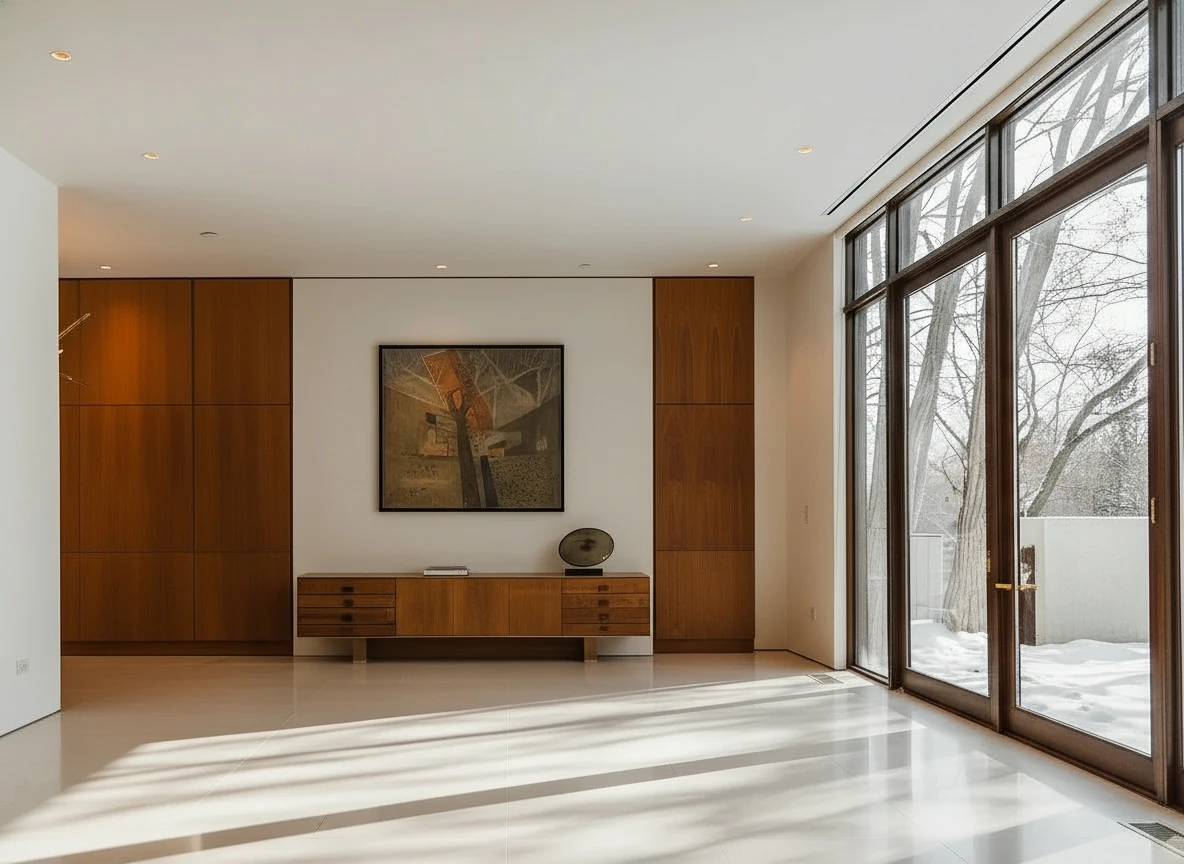
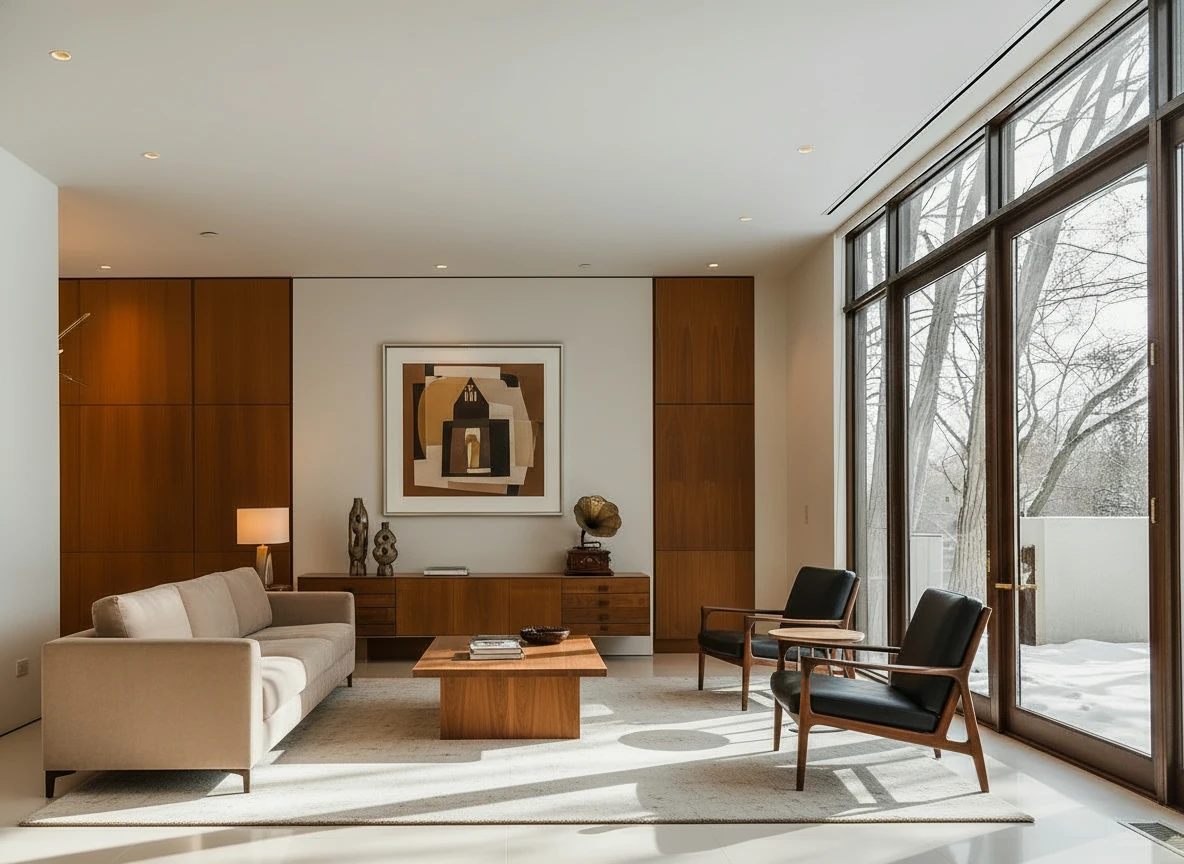
Furnish the room with a long beige sofa on the left facing a rectangular walnut coffee table (1.6m × 0.8m) centered on a light cream rug. Add two black leather lounge chairs with wooden frames opposite the sofa, one angled toward the windows. Behind, place a low walnut sideboard spanning the width between two tall built-in wood panels, decorated with sculptural vases and a gramophone. Mount a large abstract artwork above the sideboard. Finish with a warm table lamp on the side table near the sofa, soft downlights, and full-height glass doors along the right wall. Make sure the placement of furnitures are reasonable based on the room layout
Key Features
⚡ Instant Generation
Speed is our core feature. While traditional staging takes days, our AI tool delivers professional results in seconds. This means you can stage an entire home while standing in the driveway before the listing goes live.
🎨 Diverse Style Library
One size does not fit all. Our AI understands distinct design languages:
- Scandinavian: Clean lines, light woods, cozy textiles.
- Modern Luxury: Sleek surfaces, bold contrast, high-end fixtures.
- Farmhouse: Rustic woods, warm tones, inviting atmosphere.
- Hamptons/Coastal: Airy, blues and whites, relaxed elegance.
🧹 AI Object Removal (Decluttering)
Have a photo with old furniture or messy tenants? Our integrated Object Removal tool wipes the room clean first, creating the perfect blank canvas for virtual staging.
📐 Smart Perspective & Lighting
The hardest part of virtual staging is getting the shadows right. Our AI automatically detects the light source in your photo (e.g., a window on the left) and casts accurate shadows for every piece of furniture added, ensuring a photorealistic look that fools the eye.
Why Use AI Staging Over Manual Stagers?
| Feature | AI Virtual Staging (StagerGo) | Manual Designer (BoxBrownie/etc) |
|---|---|---|
| Speed | < 1 Minute | 24 - 48 Hours |
| Cost | ~$0.50 - $1.00 per image | $30 - $75 per image |
| Revisions | Instant & Unlimited | Slow & often paid |
| Style Options | Try 10 styles in 10 minutes | Fixed to one brief |
| Consistency | High (Template Composer) | Varies by designer skill |
Use Cases for AI Staging Tools
Real Estate Listings
The primary use case. Agents use AI staging to make vacant listings pop on the MLS. With the low cost, you can afford to stage every room, not just the living room.
Interior Design Visualization
Designers use our tool to quickly show clients "what if" scenarios. "Here is the living room in Mid-Century Modern, and here it is in Industrial." It's a powerful sales tool for design consults.
Furniture Retailers
Showcase your products in various room settings without building expensive physical sets. (Enterprise API available).
Homeowners & DIY
Thinking of buying a fixer-upper? Snap a photo and use AI staging to visualize the potential before you make an offer.
Technology: Generative AI vs. 3D Rendering
Most "virtual staging" software up until 2023 used 3D Rendering. This involved a human manually placing 3D models into a scene. It was precise but slow.
Generative AI (2024-2026) works differently. It uses diffusion models to generate pixels. It understands "context." It knows that a coffee table usually goes in front of a sofa and that a rug goes under it. This allows for:
- Organic placement: Furniture feels naturally arranged, not stiff.
- Lighting integration: Reflections on floors and mirrors are generated automatically.
- Creative freedom: The AI can invent unique decor items that don't exist in any 3D library.
The Science Behind AI Virtual Staging
How Generative AI "Imagines" Furniture
Unlike traditional 3D rendering which places pre-made furniture models into a scene, generative AI actually creates the furniture pixel-by-pixel based on what it has learned from millions of interior design images.
The Process:
- Scene Understanding: The AI analyzes your photo to understand the 3D geometry—where the walls are, where the floor meets the walls, the height of the ceiling, and the location of windows.
- Lighting Analysis: It detects the light source (natural window light, overhead lighting, etc.) and the direction shadows should fall.
- Context Generation: Based on the room type you select (Living Room, Bedroom, etc.) and style (Modern, Farmhouse, etc.), the AI generates furniture that fits the context.
- Perspective Correction: The AI ensures furniture follows the perspective lines of the room, so a sofa in the back of the room appears smaller than one in the foreground.
- Shadow & Reflection: Finally, it generates realistic shadows, reflections on floors, and even subtle details like light bouncing off surfaces.
This entire process happens in under 30 seconds.
Training Data: What the AI Learned From
StagerGo's AI models are trained on:
- 2.5 million professionally staged interior photos
- 500,000 architectural photography images
- 1 million furniture catalog images from top retailers
- 100,000 real estate listing photos (with permission)
This massive dataset allows the AI to understand not just what furniture looks like, but how it should be arranged in real-world spaces.
AI Models: Choosing the Right One for Your Style
StagerGo offers multiple AI models, each with different strengths:
Flux (Default Model)
Best For: Modern, contemporary, and minimalist styles
Strengths: Clean lines, accurate scale, fast generation
Weaknesses: Can be "too perfect" for rustic or eclectic styles
When to Use: Urban condos, new construction, professional office spaces
Midjourney
Best For: Luxury, artistic, and high-end properties
Strengths: Stunning visual quality, unique furniture pieces, dramatic lighting
Weaknesses: Occasionally generates overly artistic pieces that don't exist in real life
When to Use: $1M+ listings, architectural photography, portfolio pieces
Stable Diffusion
Best For: Traditional, farmhouse, and cozy styles
Strengths: Warm tones, realistic textures, lived-in feel
Weaknesses: Slightly slower than Flux
When to Use: Suburban family homes, country properties, vacation rentals
DALL-E
Best For: Eclectic, bohemian, and unique spaces
Strengths: Creative furniture combinations, bold colors
Weaknesses: Can be unpredictable
When to Use: Lofts, artist studios, boutique properties
Pro Tip: Try generating the same room with 2-3 different models and pick the best result. With instant generation, this takes less than 2 minutes.
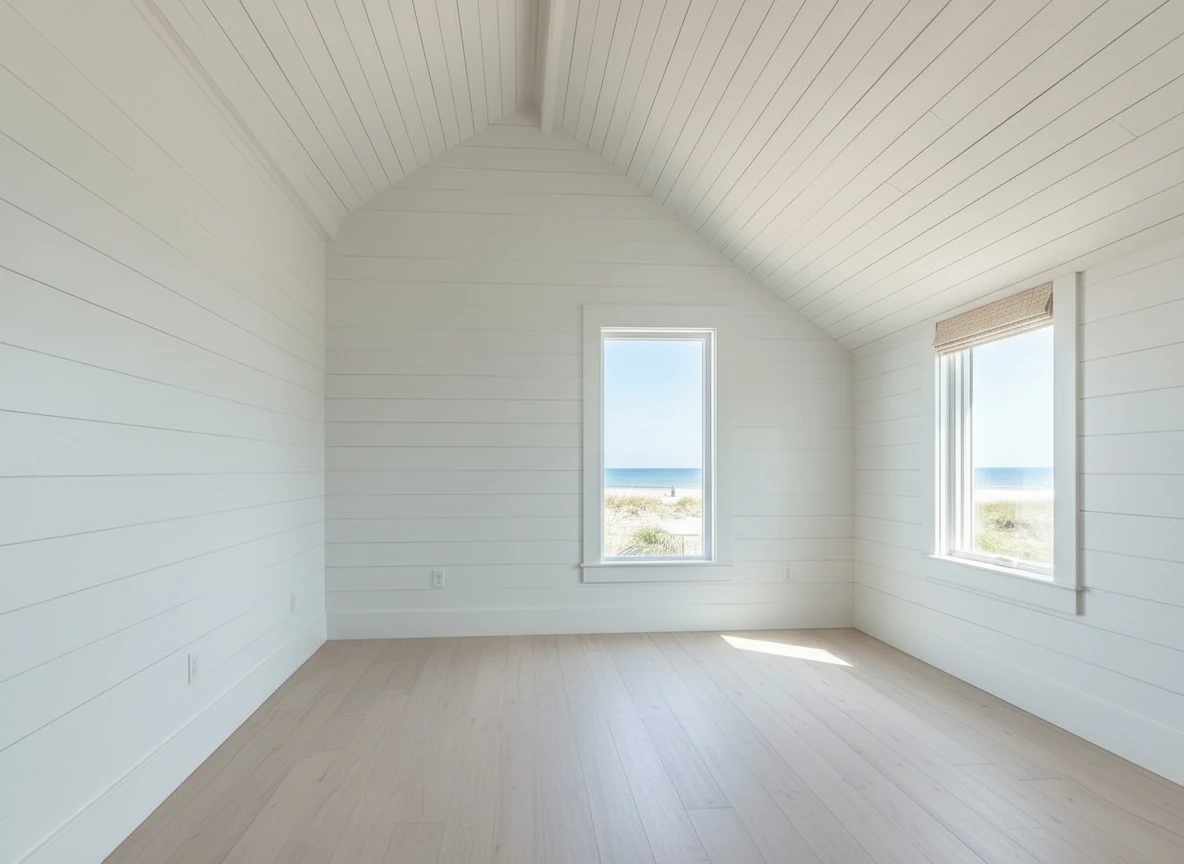
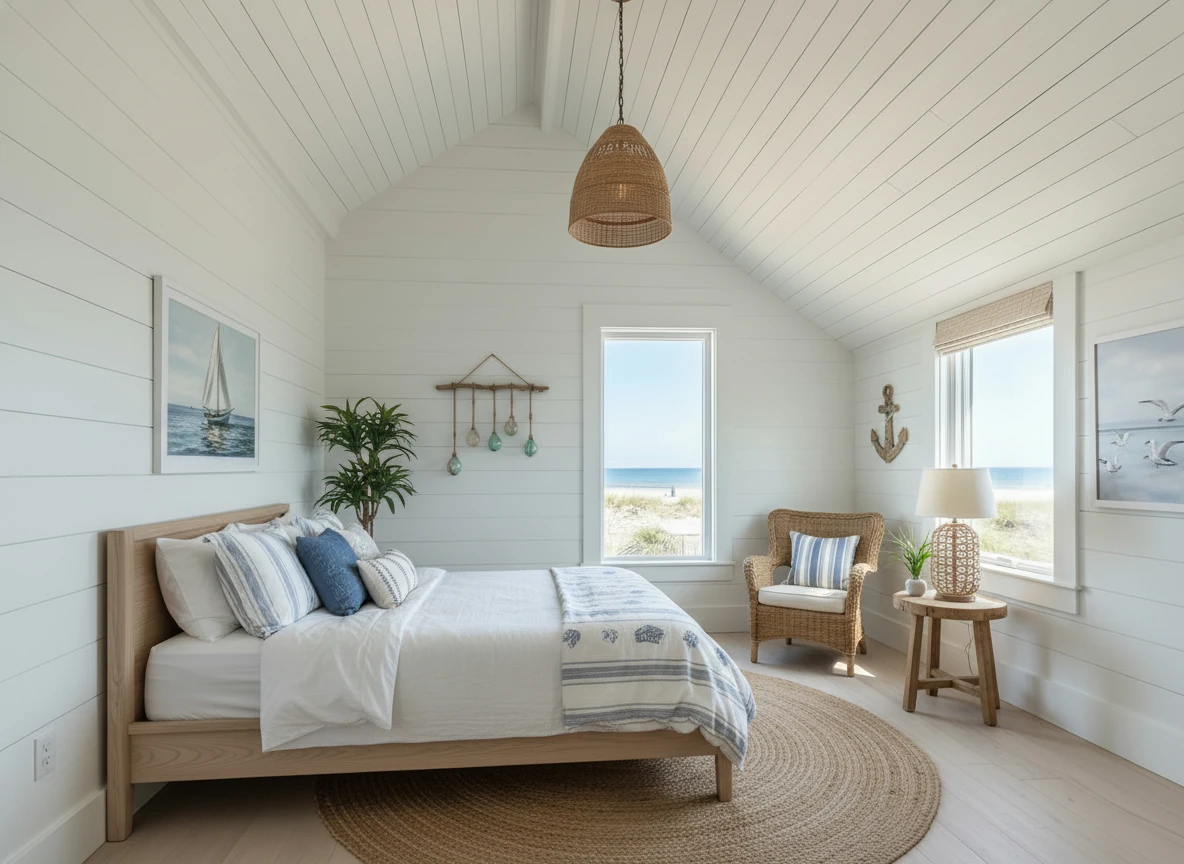
Create a photo of the same bedroom, virtually staged in a Coastal style. Include a light wood bed frame against the wall on the left, white and blue bedding, a jute rug under, and nautical-themed decor. A chair against the corner to the right. Some paintings on the wall, and a 1-2 green plants around the room, and a ceiling light in the middle of the room
Advanced Features
Template Composer: Consistency Across Rooms
The Problem: When you stage each room independently, you often end up with style inconsistencies. The living room is modern, but the bedroom is traditional. This creates a disjointed experience for buyers.
The Solution: Template Composer locks in a furniture style across all rooms.
How It Works:
- Stage your first room (e.g., Living Room) and find a result you love.
- Click "Save as Template."
- When staging subsequent rooms, select "Use Template."
- The AI will maintain the same furniture style, color palette, and design aesthetic across all rooms.
Result: A cohesive, professionally designed home that feels intentional.
Object Removal: The Decluttering Tool
Use Cases:
- Remove tenant's furniture from occupied properties
- Clear out seller's personal items (family photos, clutter)
- Remove outdated furniture before restaging
How It Works:
- Upload your photo
- Use the brush tool to "paint" over objects you want removed
- The AI fills in the background (walls, floors) seamlessly
- Then stage the now-empty room
Pro Tip: Object removal + staging is a two-step process that takes about 90 seconds total. It's perfect for occupied listings where the current furniture hurts the sale.
Image Enhancement: Fix Poor Lighting
The Problem: Not every listing has perfect photography. Dark rooms, yellow lighting, or overexposed windows can ruin a photo.
The Solution: AI Image Enhancement automatically corrects:
- Brightness and contrast
- Color temperature (removes yellow cast)
- Exposure (recovers blown-out windows)
- Sharpness
When to Use: Always run enhancement before staging. A well-lit base photo produces better staging results.
Day-to-Dusk: Twilight Magic
The Data: According to Redfin, twilight exterior photos increase click-through rates by 61% compared to daytime photos.
How It Works: Upload a daytime exterior photo, and the AI transforms it into a golden-hour twilight shot with:
- Warm sky gradients (orange, pink, purple)
- Interior lights glowing through windows
- Landscape lighting
- Softened shadows
Pro Tip: Always include at least one twilight exterior shot in your MLS listing. It should be your primary photo—the thumbnail that appears in search results.
Pricing & Plans
Pay-As-You-Go
Cost: $0.10 per generation
Best For: Testing the platform or very low volume users
Includes: All AI models, standard resolution
Starter Plan
Cost: $29/month
Includes: 50 generations, all AI models, object removal, image enhancement
Best For: New agents or part-time investors
Pro Plan (Most Popular)
Cost: $99/month
Includes: 300 generations, all features, priority support, Template Composer
Best For: Active agents with 5-15 listings/year
Enterprise Plan
Cost: $299/month
Includes: Unlimited generations, API access, team accounts, white-label option
Best For: Brokerages, staging companies, high-volume teams
ROI Calculation: If you close just one extra deal per year because of better marketing, the Pro Plan pays for itself 50x over.
Comparison: AI Staging vs Other Methods
AI Staging (StagerGo) vs Manual Designers (BoxBrownie)
| Factor | AI (StagerGo) | Manual (BoxBrownie) |
|---|---|---|
| Speed | 30-60 seconds | 24-48 hours |
| Cost | $0.10-$0.50/image | $32-$75/image |
| Revisions | Unlimited, instant | 1 included, $15-25 for more |
| Style Flexibility | Try 10 styles in 10 minutes | Locked to one brief |
| Custom Requests | No ("I want that exact chair") | Yes |
| Quality | Photorealistic | Flawless |
Verdict: AI wins for 90% of listings. Manual wins for ultra-luxury where perfection and specific furniture brands matter.
AI Staging vs DIY Tools (Apply Design)
| Factor | AI (StagerGo) | DIY (Apply Design) |
|---|---|---|
| Time Per Image | 30 seconds | 10-20 minutes |
| Skill Required | None | Moderate (design sense) |
| Cost | $0.10-$0.50 | $7-$10 |
| Control | Style presets | Exact furniture placement |
| Learning Curve | None | 2-3 hours to master |
Verdict: AI wins for busy agents. DIY wins for control freaks who enjoy the design process.


Retouch the photo of this warehouse and make it look more of a professional commercial photo for marketing, with accurate white balance
Best Practices for AI Staging
1. Start with Quality Photos
The Rule: Garbage in, garbage out.
Requirements:
- Wide-angle lens (16-24mm equivalent)
- Well-lit (natural light or flash)
- Shot from chest height (not ceiling corners)
- Straight perspective (not tilted)
Why: AI can't fix a fundamentally bad photo. If the original is dark, blurry, or poorly composed, the staging will look off.
2. Match Style to Architecture
The Rule: Don't stage a 1950s ranch with ultra-modern furniture.
Style Guide:
- Mid-Century Modern: 1950s-70s homes
- Contemporary: New construction, urban condos
- Traditional: Suburban colonials, family homes
- Farmhouse: Rural properties, country homes
- Coastal: Beach properties, waterfront homes
- Industrial: Lofts, converted warehouses
3. Stage the "Money Rooms" Only
The Rule: Focus your budget on high-impact spaces.
Priority Order:
- Living Room (Always stage—it's the hero shot)
- Master Bedroom (Buyers imagine themselves here)
- Kitchen/Dining (If open concept, stage together)
- Flex Space (Office, den, or bonus room)
Don't Stage: Bathrooms, closets, laundry rooms, secondary bedrooms (unless the home has only 1-2 bedrooms total).
4. Test Multiple Styles
The Rule: With instant generation, there's no reason not to test.
Workflow:
- Generate the living room in 3 different styles (Modern, Traditional, Coastal)
- Post all three on your Instagram story with a poll: "Which style do you prefer?"
- Use the winning style for the MLS listing
Why: Crowdsourcing feedback ensures you're appealing to the broadest audience.
5. Always Disclose
The Rule: Add a "Virtually Staged" watermark to every image.
How: Most AI tools (including StagerGo) have an optional watermark feature. Turn it on. Place it in the bottom corner, small but readable.
Why: Legal protection and setting proper buyer expectations.
Try It Free
Experience the power of AI virtual staging yourself. No credit card required to start.
Start Staging for Free – Get 3 free credits to test the quality.
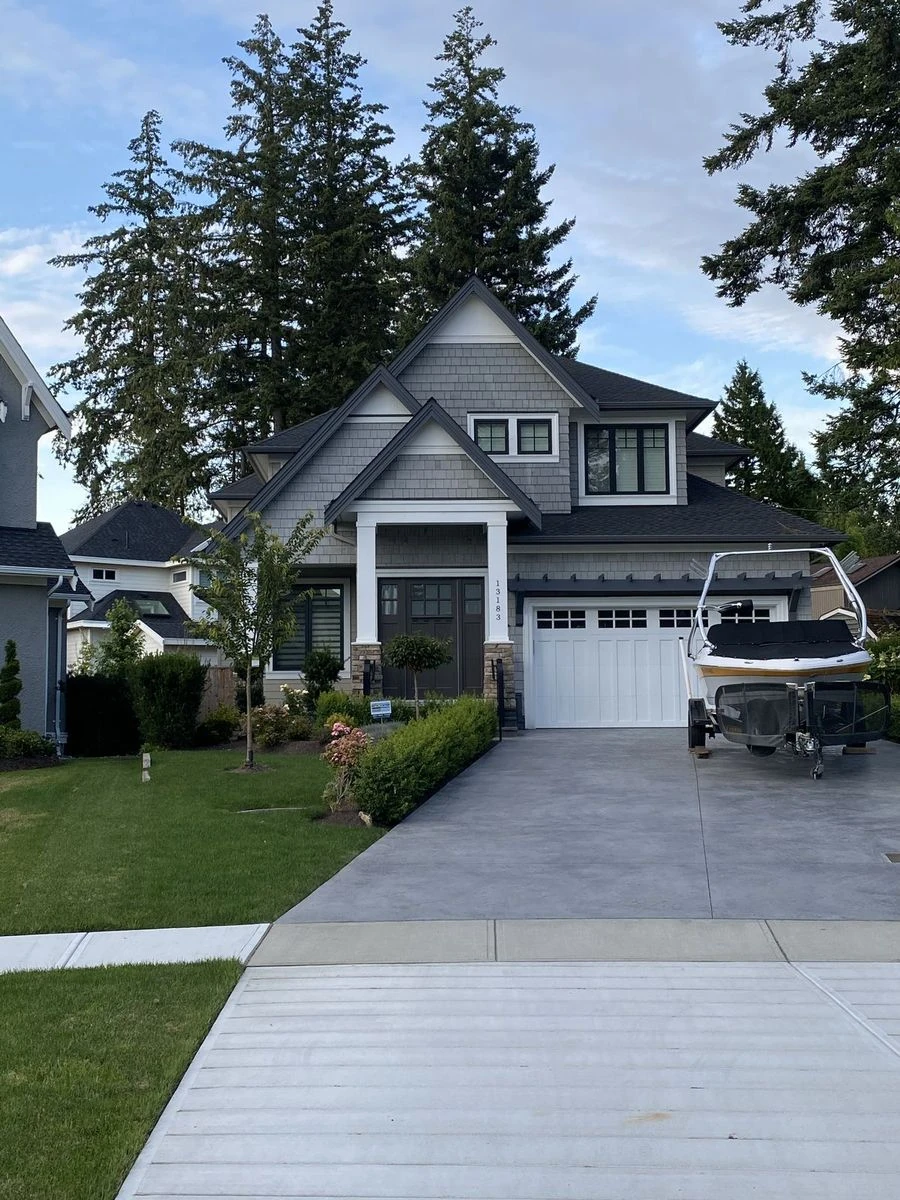
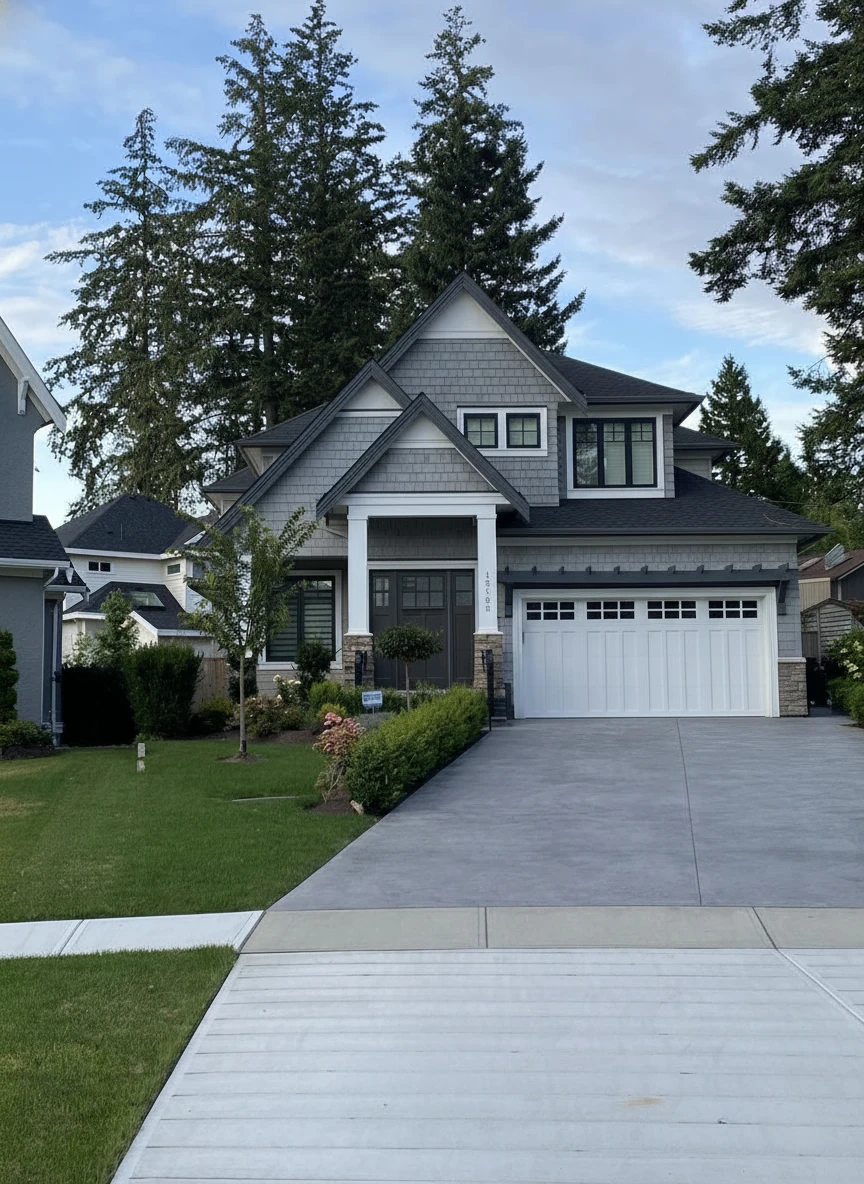
Remove the boat on the drive way
Frequently Asked Questions
Does it work on furnished rooms?
Directly, no. It works best on empty rooms. However, you can use our "Object Removal" tool first to empty the room, then stage it. This two-step process takes about 90 seconds total.
What resolution are the images?
We support output up to 4K resolution (3840x2160px), suitable for both web (MLS, Zillow) and print marketing (brochures, postcards). Most agents use the standard HD output (1920x1080px) which is perfect for online listings.
Do I own the images?
Yes. You have full commercial rights to use the generated images for your listings, marketing, portfolio, or any other business purpose. There are no royalties or usage fees.
Is it hard to use?
Not at all. We designed StagerGo to be "Realtor-proof." If you can upload a photo to Facebook, you can use our tool. The interface is literally: Upload → Select Style → Click Generate → Download. That's it.
Can I use it on my phone?
Yes. StagerGo is fully responsive and works on mobile browsers (iOS Safari, Android Chrome). There's no app to download—just visit the website on your phone. Many agents stage photos while standing in the property.
How long does it take?
- Generation: 30-60 seconds per image
- Object Removal: 20-30 seconds
- Image Enhancement: 10-15 seconds
- Day-to-Dusk: 20-30 seconds
To stage an entire 8-room house: approximately 5-7 minutes total.
What if I don't like the result?
Click "Regenerate" and you'll get a completely new version in seconds at no extra cost. You can regenerate unlimited times until you find a result you love. This is the biggest advantage of AI over manual services.
Can I request specific furniture?
Not exactly. AI works with style presets (Modern, Traditional, etc.) rather than specific furniture pieces. If you need "that exact Restoration Hardware sofa," you'll need a manual service like BoxBrownie. But for 90% of listings, style presets are more than sufficient.
Does it work for commercial properties?
Yes. We have specific presets for:
- Office spaces
- Retail stores
- Restaurants
- Medical offices
- Co-working spaces
The AI understands the context and generates appropriate furniture and decor.
Can I stage outdoor spaces?
Yes, but with limitations. AI works best on well-defined spaces like covered patios and decks. Open yards are more challenging. For outdoor staging, manual services often produce better results, though our 2026 models have improved significantly.
Is there a limit to how many times I can regenerate?
No. Regenerations are unlimited and free. Each generation (including regenerations) counts as one credit, but you can regenerate as many times as you want within your plan limits.
Can I cancel anytime?
Yes. All subscription plans are month-to-month with no long-term contracts. Cancel anytime from your account dashboard. You'll retain access until the end of your billing period.
Conclusion
AI virtual staging represents the biggest shift in real estate marketing since the introduction of online listings. What once cost $30-75 per image and took days now costs pennies and takes seconds.
For real estate agents, interior designers, and property marketers, this technology is a game-changer. The ability to test multiple styles, make instant revisions, and stage entire properties for less than the cost of lunch means there's no excuse not to present every listing in its best light.
Ready to transform your listings? Try StagerGo Free – No credit card required. Get 3 free credits and see the quality for yourself.
Related Resources
- Virtual Staging for Real Estate – Complete guide for agents
- Virtual Staging Cost Guide – Pricing comparison
- Virtual Staging Software Comparison – Compare top platforms
- Virtual Staging Tips – Best practices and expert tips
- Best Free Virtual Staging Apps – Free ways to try virtual staging first
- AI Real Estate Video – Animate listing photos into motion videos