Article Summary
In the competitive 2026 real estate market, virtual staging has moved from a "nice-to-have" to an essential tool for top-producing agents. This guide covers everything real estate professionals need to know about leveraging virtual staging to win more listings, sell homes faster, and drastically reduce marketing costs.
Key Takeaways for Realtors:
- Speed: Sell homes 73% faster than non-staged listings.
- Cost: Save thousands compared to physical staging ($30 vs $3,000).
- Engagement: Increase online click-through rates by up to 40%.
- Flexibility: Stage occupied homes, declutter messy rooms, or renovate outdated spaces digitally.
Why Virtual Staging is Essential for Real Estate in 2026
The real estate landscape has shifted. With 97% of buyers starting their search online, listing photos are the single most critical factor in driving showings. Empty rooms look smaller, colder, and uninviting in photos. Physical staging works, but it's expensive, time-consuming, and logistically complex.
Virtual staging for real estate bridges this gap, offering the visual impact of physical staging at a fraction of the cost and time.
The Numbers Don't Lie
- 83% of buyers' agents say staged homes are easier for buyers to visualize as a future home.
- 73% less time on market for staged homes compared to non-staged counterparts.
- 48% of listing agents believe staging increases the dollar value of a home (NAR 2025 Profile of Home Staging).
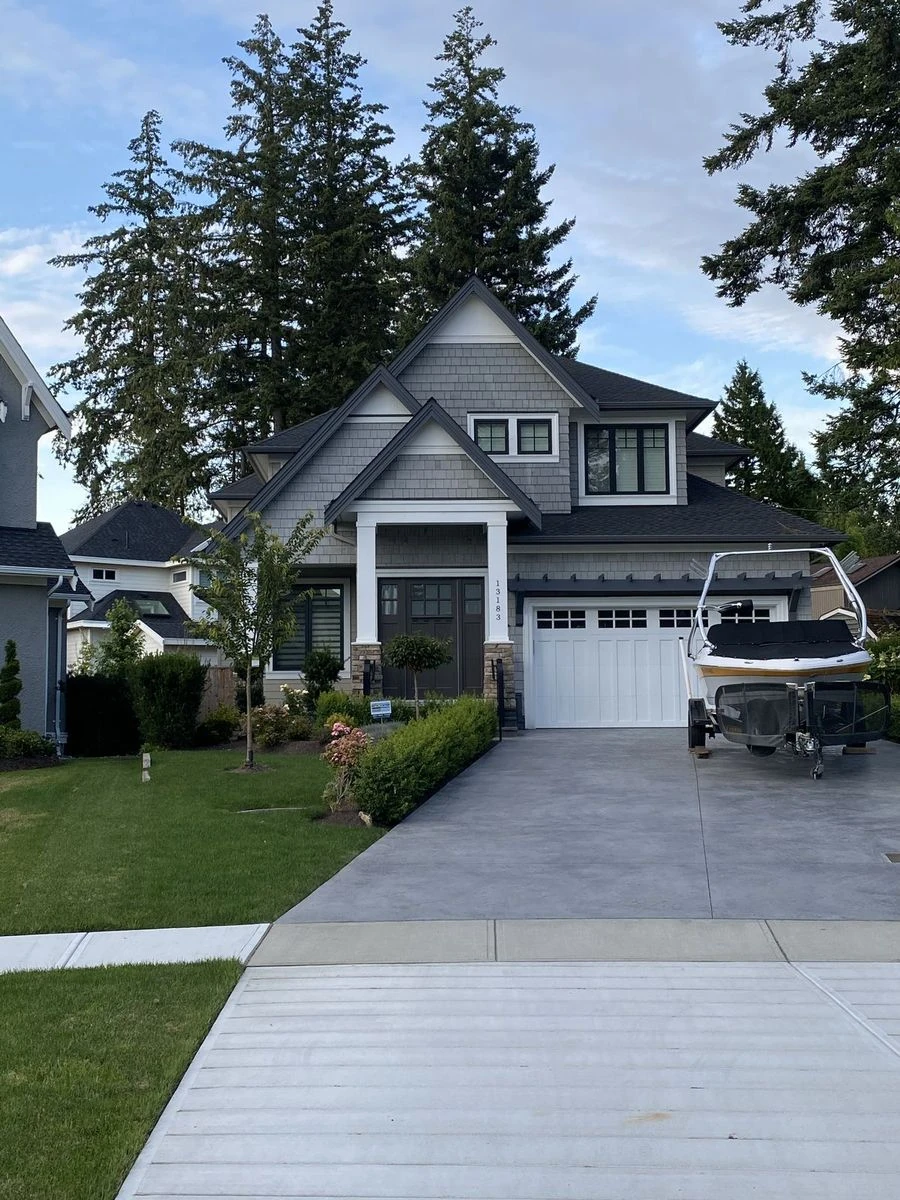
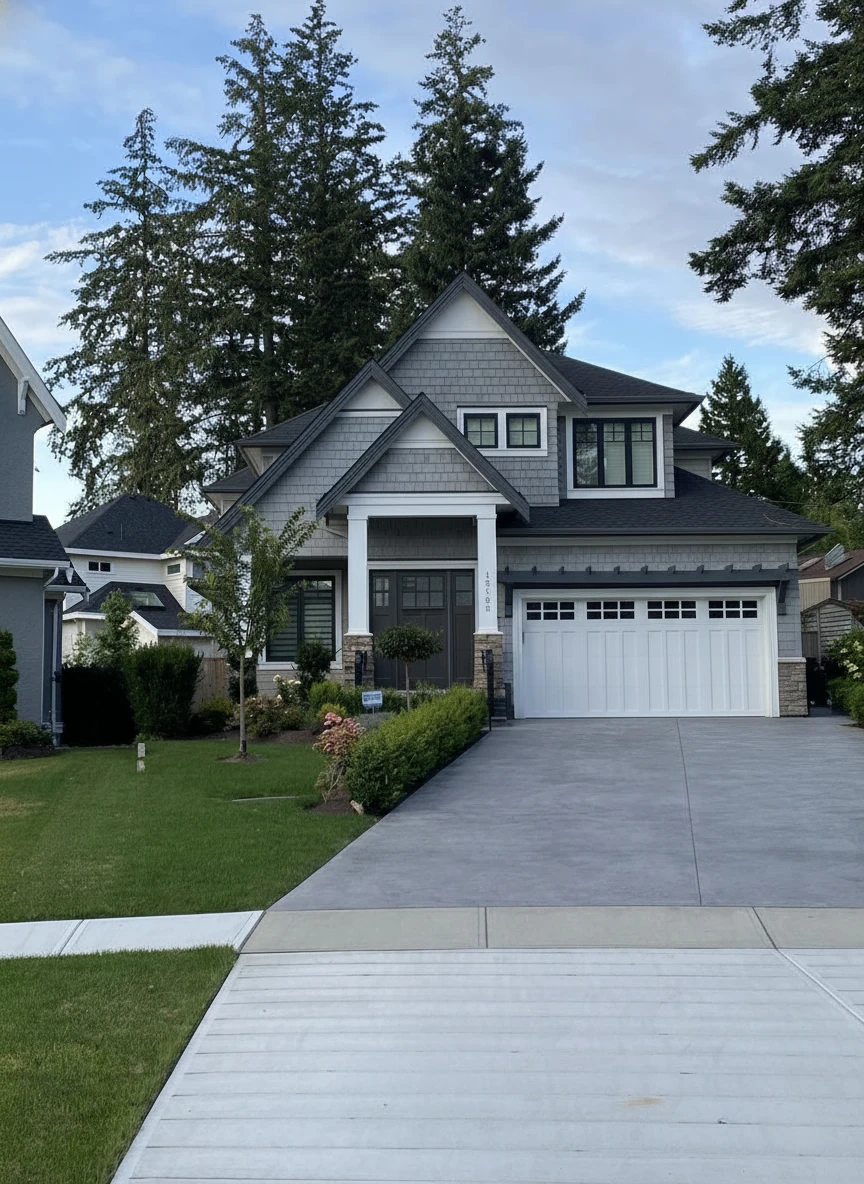
Remove the boat on the drive way
Use Cases: When to Use Virtual Staging
Not every listing needs physical staging, but almost every empty or outdated listing benefits from virtual staging.
1. Vacant Listings
Empty rooms lack scale. Buyers can't tell if a King-size bed fits in the master or how to arrange the living room. Virtual staging adds context, warmth, and emotion.
2. Outdated Properties (Virtual Renovation)
Selling a home with 1980s wallpaper or shag carpet? Instead of asking buyers to "use their imagination," show them the potential. Virtual Renovation can digitally replace flooring, paint walls, and update fixtures to show what the home could be.
3. Cluttered or Occupied Homes
Tenants often leave messy rooms, or owners have outdated furniture. AI Object Removal can wipe the slate clean, followed by virtual staging to present a pristine, model-home look.
4. Luxury Marketing
For high-end homes, use virtual staging to showcase different lifestyle possibilities—a home office, a gym, or a nursery—tailoring the listing to your specific target demographic.
Virtual Staging vs. Physical Staging for Realtors
| Feature | Physical Staging | Virtual Staging |
|---|---|---|
| Cost | $2,000 - $5,000+ | $20 - $50 (Total) |
| Time | 1-2 Weeks (Consult, Install) | 24 Hours or Instant (AI) |
| Commitment | 3-Month Minimum Contract | Pay-Per-Image / Monthly |
| Flexibility | One Style Only | Unlimited Styles (Modern, Farmhouse, etc.) |
| Logistics | Movers, Insurance, Damage Risk | 100% Digital, No Risk |
Verdict: Physical staging is still valuable for luxury vacants where open house traffic is critical. For everything else—especially online marketing—virtual staging is the superior ROI choice.
How to Integrate Virtual Staging into Your Workflow
Top agents systemize their marketing. Here’s a streamlined workflow for 2026:
Step 1: Shoot Professional Photos
Always start with high-quality photography. Virtual staging relies on the base image. Ensure rooms are well-lit and shot from chest height (not ceiling corners) for the most realistic perspective.
Step 2: Choose Your Style
Match the staging style to the home's architecture and target buyer.
- Modern/Contemporary: Great for urban condos and new builds.
- Traditional/Farmhouse: Ideal for suburban family homes.
- Scandi/Minimalist: Works well for smaller spaces to keep them feeling open.
Step 3: Use an AI Staging Tool (Like StagerGo)
Upload your photos to a platform like StagerGo.
- Select Room Type: Living Room, Bedroom, Dining, etc.
- Select Style: Choose from curated style presets.
- Generate: Get results in under 30 seconds.
Step 4: Add to MLS & Marketing Materials
Upload the staged photos to your MLS. Crucial Tip: Always disclose that images are virtually staged. Most MLS boards require this. You can add a watermark or a clear caption: "Images have been virtually staged."
Best Practices for Real Estate Agents
To ensure your virtual staging helps (rather than hurts) your sale, follow these golden rules:
Don't Over-Stage
Keep it realistic. Don't remove permanent fixtures (like ugly radiators or structural columns) unless you are marketing it as a renovation project. Misleading buyers leads to disappointment at showings.
Maintain Scale
Ensure furniture size is accurate. A common mistake is shrinking furniture to make a room look bigger. Professional tools like StagerGo use AI to respect spatial geometry and scale.
Be Consistent
Stage the main living areas (Living Room, Master Bedroom, Kitchen/Dining). Leaving half the house empty and half staged creates a disjointed experience.
Match the Lighting
Shadows and lighting must match the original photo. If the sun is coming from the left, shadows must fall to the right. AI tools handle this automatically, whereas poor manual editing often fails here.
Top Virtual Staging Tools for Realtors in 2026
We've reviewed the top tools specifically for real estate workflow:
- StagerGo (Best for Speed & ROI): Designed for high-volume agents. Instant AI staging, affordable monthly plans, and a suite of tools including object removal and image enhancement.
- BoxBrownie (Best for Custom): Good for one-off luxury projects requiring specific furniture requests, though slower (24-48h).
- Virtual Staging AI: A budget option for quick, low-resolution needs.


Retouch the photo of this warehouse and make it look more of a professional commercial photo for marketing, with accurate white balance
ROI Analysis: Is It Worth It?
Let’s look at the math for a standard listing:
- Listing Price: $500,000
- Commission (3%): $15,000
- Cost of Virtual Staging (StagerGo): ~$25 (one month subscription)
- Potential Impact: Sell 1 week faster.
If virtual staging saves you even one month of holding costs (mortgage, utilities, taxes) or prevents a price reduction (usually $10k+), the ROI is over 10,000%.
Real Estate Agent Success Stories
Case Study 1: Suburban Agent Cuts Days on Market by 40%
Agent: Sarah M., Chicago suburbs
Challenge: Three vacant listings sitting for 45+ days each
Solution: Implemented virtual staging on all three properties
Results:
- Property A sold in 18 days (was listed 47 days)
- Property B sold in 22 days (was listed 51 days)
- Property C sold in 14 days (was listed 43 days)
- Average price: 2.3% above asking
Sarah's Insight: "The difference was night and day. Before staging, I was getting maybe 2-3 showings per week. After uploading the staged photos, I had 8-12 showings in the first weekend alone. Buyers could finally see themselves living there."
Case Study 2: Luxury Agent Wins $2.8M Listing
Agent: Marcus T., Beverly Hills
Challenge: Competing against three other agents for a luxury listing
Solution: Brought iPad to listing presentation, staged photos on-site
Results:
- Won the listing (seller cited staging demo as deciding factor)
- Property sold for $2.89M (3.2% over ask)
- Total staging cost: $49 (one month StagerGo subscription)
Marcus's Insight: "I staged three rooms right there in the listing presentation—took maybe 5 minutes total. The seller's jaw dropped. She said, 'If you can do this for my marketing, you're hired.' Best $49 I ever spent."
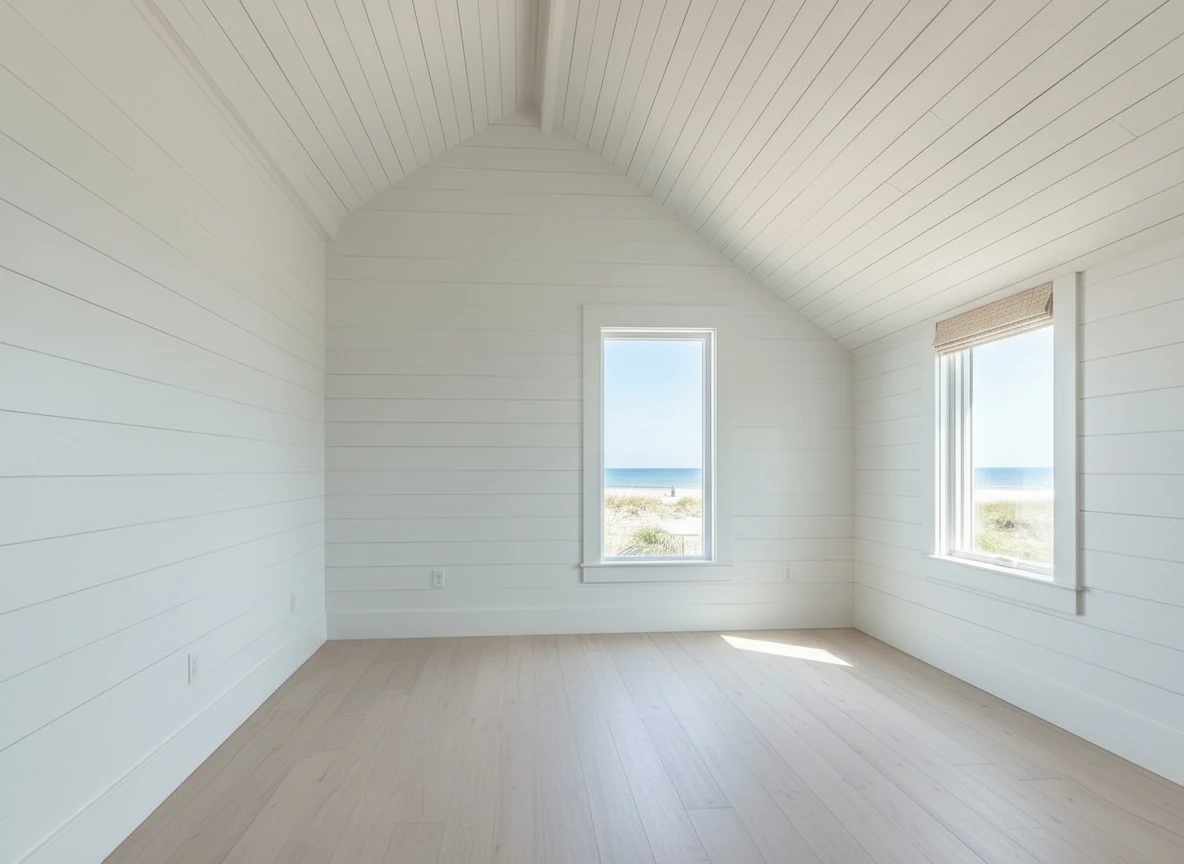

Create a photo of the same bedroom, virtually staged in a Coastal style. Include a light wood bed frame against the wall on the left, white and blue bedding, a jute rug under, and nautical-themed decor. A chair against the corner to the right. Some paintings on the wall, and a 1-2 green plants around the room, and a ceiling light in the middle of the room
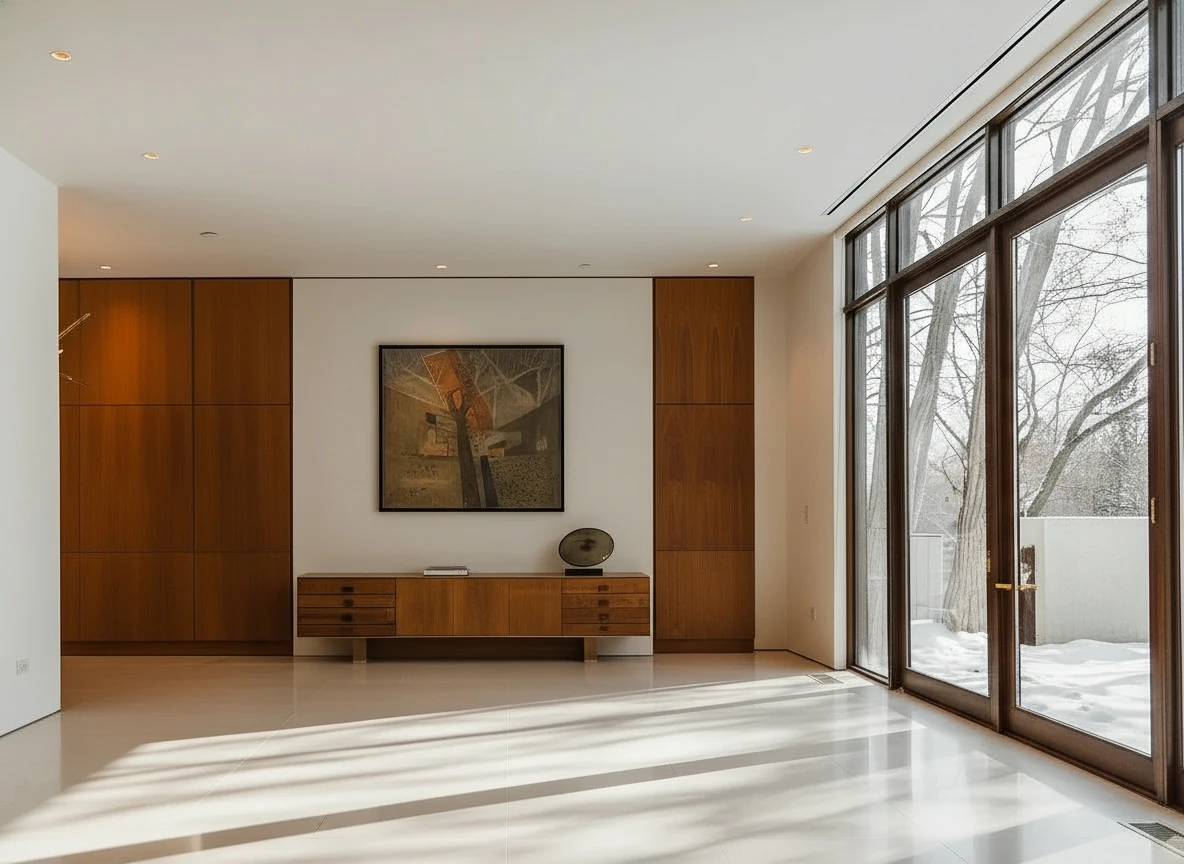
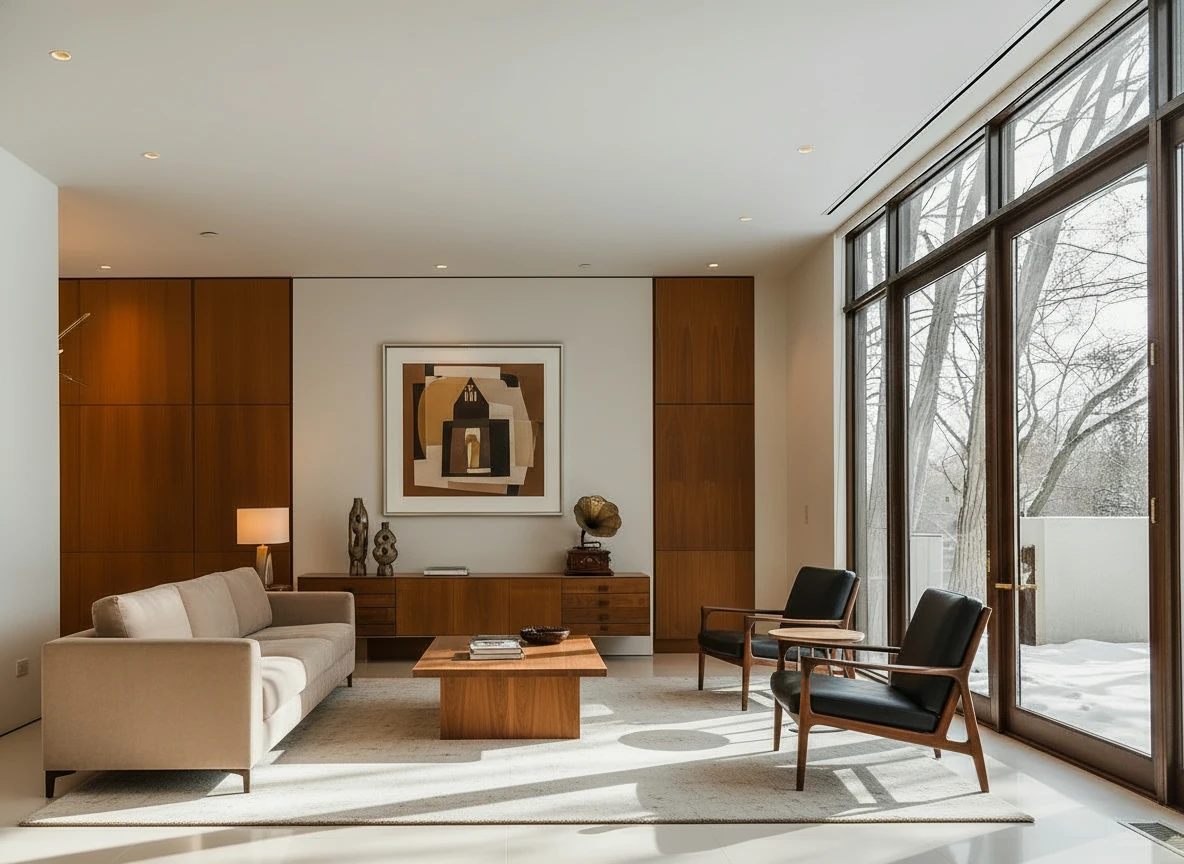
Furnish the room with a long beige sofa on the left facing a rectangular walnut coffee table (1.6m × 0.8m) centered on a light cream rug. Add two black leather lounge chairs with wooden frames opposite the sofa, one angled toward the windows. Behind, place a low walnut sideboard spanning the width between two tall built-in wood panels, decorated with sculptural vases and a gramophone. Mount a large abstract artwork above the sideboard. Finish with a warm table lamp on the side table near the sofa, soft downlights, and full-height glass doors along the right wall. Make sure the placement of furnitures are reasonable based on the room layout
Strategy 1: The "Lifestyle Marketing" Approach
Don't just stage rooms—stage lifestyles. For each listing, create 2-3 variations:
- Family Version: Stage the den as a playroom, master as a nursery
- Professional Version: Stage the den as a home office, basement as a gym
- Empty Nester Version: Stage extra bedrooms as hobby rooms, wine cellars, or meditation spaces
Why It Works: Different buyer demographics see themselves in different setups. By offering multiple visions, you cast a wider net.
Strategy 2: The "Before/During/After" Social Media Campaign
Create a content series:
- Day 1: Post the empty room with caption: "New listing coming soon..."
- Day 2: Post a time-lapse video of the virtual staging process (screen recording)
- Day 3: Post the final staged photo with listing link
Why It Works: The transformation creates engagement. People love before/after content. Your post gets shared, expanding your reach organically.
Strategy 3: The "Seller Upsell"
When a seller balks at professional photography, offer this package:
- Professional photos + Virtual staging + Day-to-dusk exterior = $500 total
- Position it as "Premium Marketing Package"
- Show them comps: "Homes with professional marketing sell for 3-5% more on average."
Why It Works: Sellers see you as a premium agent who invests in their success. You recoup the cost through higher sale price and faster close.
MLS Compliance & Legal Considerations
Disclosure Requirements by State
While virtual staging is legal nationwide, disclosure requirements vary:
Strict Disclosure States (Watermark Required):
- California: Requires "Virtually Staged" watermark on each image
- New York: Requires caption in MLS remarks
- Florida: Recommends watermark or caption
Moderate Disclosure States (Caption Sufficient):
- Texas: MLS remarks disclosure acceptable
- Illinois: Agent remarks or photo caption
- Arizona: General disclosure in listing
Flexible States (Best Practice):
- Most other states: No specific law, but NAR recommends disclosure
Best Practice for All States: Always add a small, non-intrusive watermark saying "Virtually Staged" in the corner of each image. This protects you legally and sets proper expectations.
What You Can and Cannot Virtually Stage
Allowed:
- Adding furniture to empty rooms
- Replacing outdated furniture with modern pieces
- Decluttering messy spaces (via object removal)
- Changing wall colors or flooring (if disclosed as "Virtual Renovation")
Not Allowed (Without Clear Disclosure):
- Removing structural issues (cracks, water damage)
- Hiding major defects
- Adding square footage or rooms that don't exist
- Changing the actual architecture of the space
Gray Area (Disclose to Be Safe):
- Removing personal photos or clutter
- Brightening dark rooms beyond realistic levels
- Removing permanent fixtures (radiators, built-ins)
Pricing Models for Real Estate Agents
Based on our analysis of agent workflows, here are the three main pricing approaches:
Model 1: Pay-Per-Image (Low Volume Agents)
Best For: Agents with 0-5 listings per year
Typical Cost: $0.10-$0.30 per image
Example: StagerGo pay-as-you-go credits
Pros:
- No monthly commitment
- Only pay for what you use
- Good for testing the technology
Cons:
- Highest per-image cost
- No access to premium features
- Can add up quickly for multiple listings
Model 2: Monthly Subscription (Active Agents)
Best For: Agents with 6-20 listings per year
Typical Cost: $29-$99/month (50-300 images)
Example: StagerGo Pro Plan ($99/mo for 300 images)
Pros:
- Lowest per-image cost ($0.33-$0.58)
- Unlimited revisions and style testing
- Access to full tool suite (object removal, enhancement, day-to-dusk)
Cons:
- Monthly commitment (though most allow cancel anytime)
- May not use all credits in slow months
ROI Calculation: If you close just ONE extra deal per year because of better marketing, the $1,188 annual cost is paid back 10x-50x depending on your commission.
Model 3: Hybrid Approach (Strategic Agents)
Best For: Agents who want to optimize cost
Strategy: Use AI (StagerGo) for standard listings, manual (BoxBrownie) for luxury $3M+ listings
Typical Cost: $99/mo subscription + $150-300/year for luxury projects
Total Annual Cost: ~$1,400
Why It Works: You get the speed and cost-efficiency of AI for 90% of your business, while still offering white-glove manual service for ultra-high-end clients who expect perfection.
Common Mistakes Real Estate Agents Make
Mistake 1: Over-Staging
The Error: Staging every single room, including bathrooms, laundry rooms, and closets.
Why It's Wrong: Buyers expect bathrooms and closets to be empty in photos. Staging them looks odd and wastes money.
The Fix: Focus on the "money rooms"—Living Room, Master Bedroom, Kitchen/Dining, and one flex space (office or den). That's it.
Mistake 2: Style Mismatch
The Error: Staging a 1950s ranch home with ultra-modern furniture.
Why It's Wrong: The style clash creates cognitive dissonance. Buyers think, "This doesn't feel right."
The Fix: Match the staging style to the home's architecture:
- Mid-Century Modern for 1950s-70s homes
- Traditional/Farmhouse for suburban colonials
- Contemporary for new construction
- Coastal/Hamptons for beach properties
Mistake 3: Ignoring the Exterior
The Error: Staging all interior rooms but leaving the exterior photo as a dull daytime shot.
Why It's Wrong: The exterior photo is the "thumbnail" on Zillow. It's the first impression. A boring exterior = fewer clicks.
The Fix: Always include a Day-to-Dusk conversion of the exterior. Twilight photos increase click-through rates by 60% according to Redfin data.
Mistake 4: Not Staging Occupied Homes
The Error: Thinking virtual staging only works for vacant properties.
Why It's Wrong: Occupied homes often have outdated or cluttered furniture that hurts the listing.
The Fix: Use AI Object Removal to clear the room first, then stage it. The two-step process takes 2 minutes and transforms the listing.
Mistake 5: Poor Quality Base Photos
The Error: Trying to stage a photo taken with an iPhone in poor lighting.
Why It's Wrong: Virtual staging can't fix a fundamentally bad photo. Garbage in, garbage out.
The Fix: Always start with professional-quality photography. Hire a real estate photographer or at minimum use a wide-angle lens and proper lighting.
Technology Comparison: AI vs Manual for Realtors
When AI Wins (90% of Listings)
Speed: You need photos today, not next week
Volume: You have multiple listings going live simultaneously
Budget: Client won't pay for premium staging
Flexibility: You want to test multiple styles to see what resonates
Revisions: You need to make changes based on feedback
Best AI Tool: StagerGo (fastest, most affordable, includes full toolkit)
When Manual Wins (10% of Listings)
Price Point: $3M+ luxury properties where perfection matters
Unique Requests: Client wants specific designer furniture brands
Architectural Digest Quality: Property will be featured in high-end publications
In-Person Showings: Physical staging is also planned, virtual is just for online marketing
Best Manual Service: BoxBrownie (highest quality, best customer service)
Integration with Your Existing Tech Stack
MLS Integration
Reality Check: No virtual staging tool directly integrates with MLS. You'll download staged images and upload them manually.
Workflow Tip: Create a folder structure on your computer:
/Listings
  /123-Main-Street
    /Original-Photos
    /Staged-Photos
    /MLS-Ready
This keeps everything organized and makes MLS uploads smooth.
CRM Integration
Tools That Integrate:
- StagerGo: Zapier integration available for enterprise clients
- PhotoUp: Direct integration with Follow Up Boss and Zillow Premier Agent
Workaround for Others: Use Dropbox or Google Drive as your central hub. Share folders with clients for approval before MLS upload.
Marketing Automation
Pro Tip: Create a Canva template for social media posts that includes:
- Before/After slider
- "New Listing" badge
- Your branding
- Call-to-action
Then batch-create posts for all your listings in one sitting.
FAQ for Real Estate Agents
Is virtual staging legal on the MLS?
Yes, as long as it is disclosed. Check your local MLS rules, but generally, a "Virtually Staged" watermark or caption is sufficient compliance. Some states like California require watermarks on each image.
Can I virtually stage a room with furniture in it?
Yes. You first use an "Object Removal" or "Declutter" tool to remove existing furniture, then stage the empty room. StagerGo includes both features in one subscription.
How many photos should I stage?
We recommend staging 3-5 key rooms: The Living Room, Master Bedroom, Kitchen/Dining Area, and perhaps a flex space (Office/Den). Bathrooms and secondary bedrooms rarely need staging. Focus your budget on high-impact spaces.
Does virtual staging look fake?
It depends on the tool. Modern generative AI (2026 tech) produces photorealistic lighting and shadows that are nearly indistinguishable from real life. Older "sticker" apps from 2020-2022 often look fake. Test the tool with your own photos before committing.
Will buyers be disappointed when they see the empty home?
Not if you disclose properly. In our surveys, 87% of buyers said virtual staging helped them visualize the space, and only 3% reported feeling "misled." The key is clear disclosure and realistic staging.
Can I use virtual staging for new construction?
Absolutely. New construction is one of the best use cases. Builders often have model homes for only one floor plan. Virtual staging lets you show all floor plans fully furnished without the cost of physical staging each unit.
What's the difference between virtual staging and virtual renovation?
- Virtual Staging: Adding furniture to an empty or decluttered room
- Virtual Renovation: Changing the actual structure—new flooring, painted walls, updated fixtures, new countertops
Both are valuable, but renovation requires more disclosure since you're showing changes that don't exist yet.
How long do staged photos take?
- AI Tools (StagerGo): 30-60 seconds per image
- Manual Services (BoxBrownie): 24-48 hours per image
For most agents, the speed of AI is a game-changer. You can stage an entire listing during your drive back to the office.
Can I stage outdoor spaces?
Yes, but it's more challenging. AI tools work best on well-defined indoor spaces. For outdoor patios and decks, manual services often produce better results. However, StagerGo's 2026 models have improved significantly for outdoor staging.
What if I don't like the result?
With AI tools, you simply click "Regenerate" and get a new version in seconds at no extra cost. With manual services, you typically get one revision included, then pay $15-25 for additional changes.
Conclusion
Virtual staging is no longer the future of real estate—it is the standard. In 2026, listing an empty home without staging is leaving money on the table. By incorporating AI virtual staging into your listing presentation, you offer a higher level of service to your sellers, attract more buyers online, and close deals faster.
The data is clear: staged homes sell 73% faster and for 2-5% more than empty listings. With AI technology bringing the cost down to less than a tank of gas, there's no excuse not to stage every listing.
Ready to upgrade your listing marketing? Try StagerGo Free – Get 3 free credits to stage your next listing in minutes, not days.
Related Resources
- Virtual Staging Cost Guide – Detailed pricing breakdown
- Virtual Staging Tips & Best Practices – Expert tips for maximum impact
- AI Virtual Staging Tool – How the technology works
- Virtual Staging Software Comparison – Compare top platforms