Try Professional Virtual Staging for Free
We believe seeing is believing. That's why we offer a 100% free trial of StagerGo's premium AI virtual staging platform. No credit card required, no commitments, and no "watermarked" low-res tricks. Just pure value to let you test the technology.
What's Included in Your Free Trial?
Sign up in seconds and receive 3 Free Credits.
- 3 High-Resolution Stages: Stage three different rooms or try three styles on one room.
- Access to All Styles: Use our full library (Modern, Scandinavian, Industrial, etc.).
- Object Removal Tool: Test our decluttering magic.
- Commercial Use: You keep the images you generate.
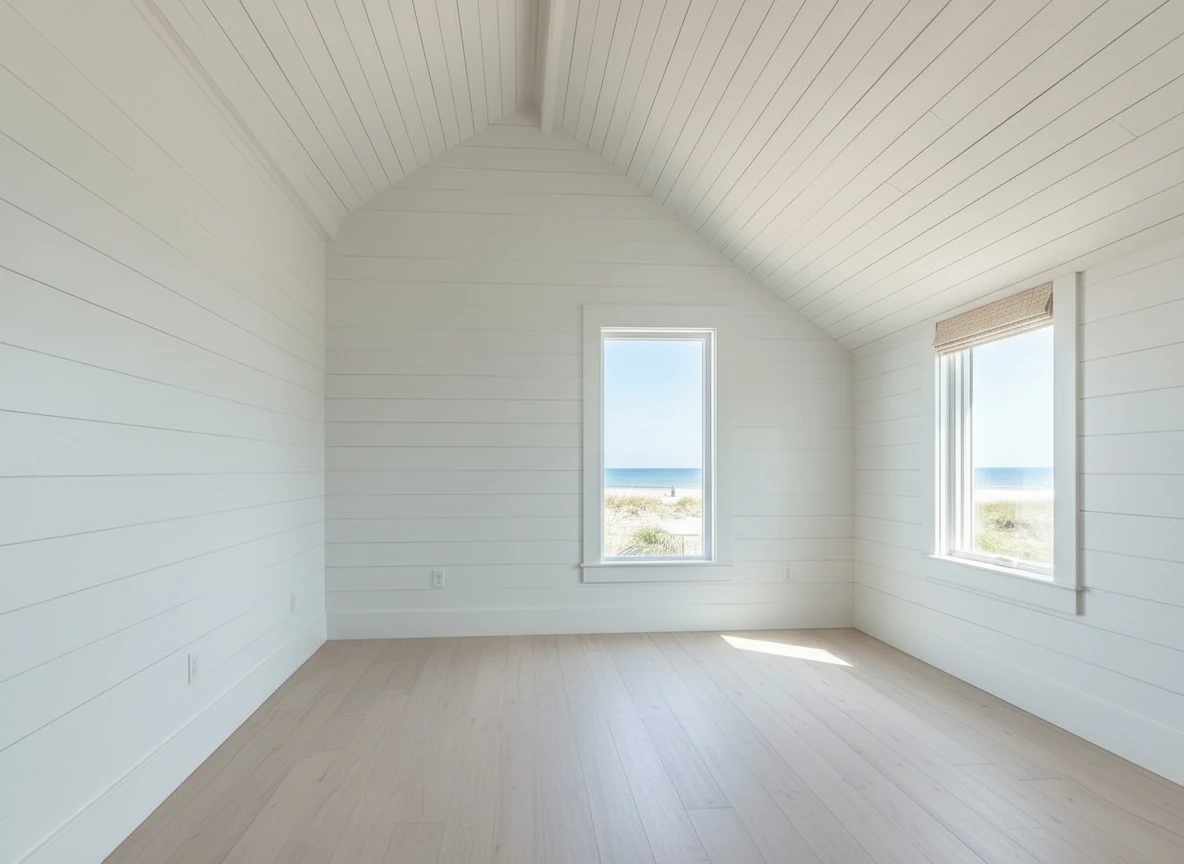
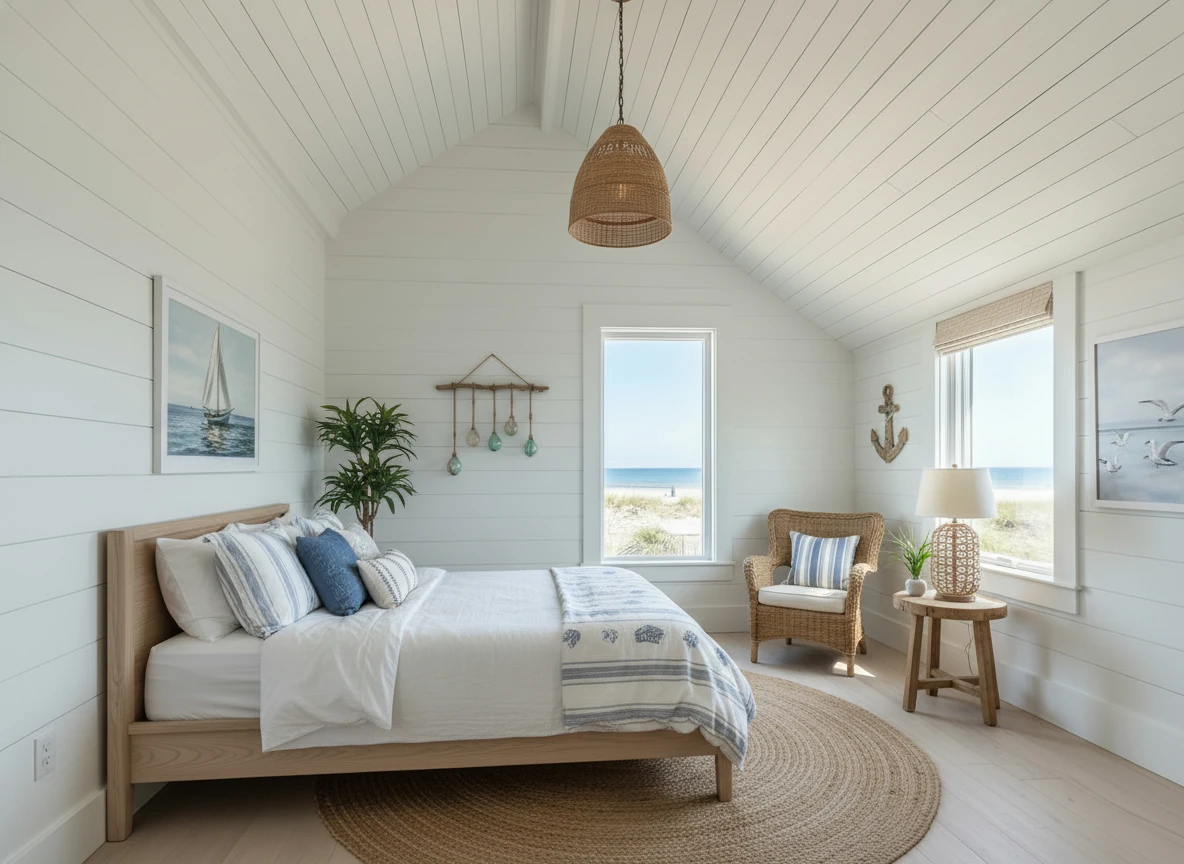
Create a photo of the same bedroom, virtually staged in a Coastal style. Include a light wood bed frame against the wall on the left, white and blue bedding, a jute rug under, and nautical-themed decor. A chair against the corner to the right. Some paintings on the wall, and a 1-2 green plants around the room, and a ceiling light in the middle of the room
How to Claim Your Free Trial
- Create an Account: Sign up with your email or Google account. Click here to start.
- Upload a Photo: Choose a photo of an empty room (JPEG or PNG).
- Select a Style: Pick a design style and room type.
- Generate: Watch the AI work in under 30 seconds.
- Download: Save your staged image instantly.
Why We Offer This
Most "free" virtual staging tools are actually just "freemium" traps that force you to pay to download the image without a giant watermark.
We are different. We know that once you see the quality of StagerGo—how it handles lighting, shadows, and perspective—you'll want to use it for all your listings. Our free trial is our way of proving our quality upfront.
What Can You Do with Free Credits?
1. Test the "Unsellable" Room
Have a listing with a weirdly shaped living room that buyers can't figure out? Use a free credit to stage it and see if it helps visualization.
2. Compare Against Your Current Vendor
Currently paying BoxBrownie $32/image? Take the same raw photo, run it through StagerGo for free, and compare the results side-by-side. You might just save yourself $30.
3. Win a Listing Presentation
Take a photo of a potential client's empty home during the listing presentation. Stage it on your phone right there (it takes less than 1 minute) and show them: "This is how I will market your home." It's a guaranteed closer.
Comparison: StagerGo Free Trial vs. Others
| Feature | StagerGo Free Trial | Competitor A (Free) | Competitor B (Free) |
|---|---|---|---|
| Credit Card Required? | No | Yes | No |
| Watermark? | None | Yes (Huge) | Yes |
| Resolution | High | Low (Web only) | Low |
| Styles Included | All 12+ | Limited | Limited |
| Object Removal | Included | Paid only | Not available |


Retouch the photo of this warehouse and make it look more of a professional commercial photo for marketing, with accurate white balance
What Makes Our Free Trial Different?
No Bait-and-Switch
Most "free" virtual staging tools follow this playbook:
- Let you upload a photo
- Generate a staged version
- Show you a preview with a giant watermark
- Force you to pay $10-30 to download the unwatermarked version
We don't do that. When you use your 3 free credits, you get the full, high-resolution, unwatermarked image. Period.
No Credit Card Trap
Many platforms require a credit card "just for verification" and then auto-enroll you in a subscription you have to remember to cancel.
We don't do that either. Sign up with just your email. No credit card. No auto-billing. No tricks.
Real Quality, Not Demo Quality
Some platforms give you "free" access to a lower-quality AI model, reserving the good stuff for paid users.
Not here. Your free trial uses the exact same AI models (Flux, Midjourney, Stable Diffusion) as our Pro subscribers. You're testing the real product.
How Real Estate Agents Use the Free Trial
Strategy 1: The "Listing Presentation Closer"
Scenario: You're competing against 2-3 other agents for a listing.
Tactic:
- During the walkthrough, take a photo of the empty living room on your phone
- While the seller is talking to another agent, open StagerGo on your phone
- Stage the photo (takes 30 seconds)
- When it's your turn to present, show them: "This is how I'll market your home"
Result: You win the listing. Sellers are blown away by the technology and your proactive approach.
Cost: $0 (used 1 of your 3 free credits)
Strategy 2: The "Competitor Comparison"
Scenario: You're currently paying BoxBrownie $32/image and wondering if AI is good enough.
Tactic:
- Take one of your recent listings
- Use the same raw photo you sent to BoxBrownie
- Stage it with StagerGo
- Compare side-by-side
Result: In 90% of cases, agents find the AI version is "good enough" for standard listings, saving them $30+ per image.
Cost: $0 (used 1 of your 3 free credits)
Strategy 3: The "Style Test"
Scenario: You have a listing but aren't sure which style will resonate with buyers.
Tactic:
- Stage the living room in Modern style (Credit 1)
- Stage it again in Farmhouse style (Credit 2)
- Stage it again in Coastal style (Credit 3)
- Post all three on Instagram with a poll: "Which do you prefer?"
Result: You get free market research from your audience and use the winning style for your MLS photos.
Cost: $0 (used all 3 free credits strategically)
What Happens After the Free Trial?
Option 1: Do Nothing
Your account stays active. You just won't be able to generate more images until you add credits or subscribe. No auto-billing. No pressure.
Option 2: Pay-As-You-Go
Buy credits in small packs:
- 10 credits for $1 ($0.10 each)
- 50 credits for $4 ($0.08 each)
- 100 credits for $7 ($0.07 each)
Best For: Agents with 1-3 listings per year
Option 3: Subscribe (Best Value)
- Starter: $29/month for 50 images
- Pro: $99/month for 300 images (most popular)
- Enterprise: $299/month for unlimited images
Best For: Active agents with 5+ listings per year
ROI Math: If you close just ONE extra deal per year because of better marketing, the Pro plan pays for itself 50x over.
Success Stories from Free Trial Users
"I Won the Listing on the Spot"
Agent: Jennifer K., Austin, TX
Situation: Competing for a $750k listing against two veteran agents
What She Did: Used her free trial to stage the seller's empty living room during the listing presentation on her iPad.
Result: "The seller literally said, 'You're hired' before I even finished my presentation. The other agents just had generic market reports. I showed her the future of her listing in real-time. Game changer."
Outcome: Won listing, sold in 12 days, earned $22,500 commission. Cost of staging: $0 (free trial).
"I Saved $240 on One Listing"
Agent: Marcus R., Phoenix, AZ
Situation: Was paying BoxBrownie $32/image for 8 rooms = $256 per listing
What He Did: Used free trial to test StagerGo quality against BoxBrownie.
Result: "I couldn't tell the difference for standard listings. I still use BoxBrownie for luxury properties over $2M, but for everything else, I switched to StagerGo. I'm saving about $200 per listing."
Outcome: Now pays $99/month for unlimited staging vs. $256 per listing. Annual savings: ~$2,000+
"I Staged My First Listing Before I Even Had a License"
Agent: Sarah P., Denver, CO
Situation: Real estate student preparing for licensing exam
What She Did: Used free trial to practice staging photos from Zillow listings.
Result: "By the time I got my license, I already knew how to stage listings. My broker was impressed. I got my first listing in week 2 and already had the skills to market it properly."
Outcome: Confident start to real estate career with modern tech skills.
Common Questions About the Free Trial
Do I need to cancel anything? No. There's nothing to cancel. The free trial doesn't auto-convert to a paid plan. Your account simply goes inactive after you use your 3 credits.
Can I get more free credits? The free trial is one-time per user. However, we occasionally run promotions (follow us on social media for announcements).
What if I use all 3 credits and want more immediately? You can purchase additional credits or subscribe at any time from your account dashboard.
Can I use the free trial for commercial purposes? Yes. The images you generate during the free trial are yours to use for listings, marketing, or any commercial purpose.
Is there a time limit on the free trial? No. Your 3 credits never expire. Use them today, next week, or next month. They'll be waiting for you.
Can I share my free trial with my team? The free trial is per user account. If you have a team, each person can sign up for their own free trial. For teams, we offer discounted Enterprise plans with multiple user seats.
What information do you collect during signup? Just your email address (or Google login). We don't ask for your phone number, credit card, or any other personal information for the free trial.
Will I get spammed with emails? No. We send one welcome email with tips on how to use your free credits, and that's it. You can unsubscribe from any future emails with one click.
Technical Specifications
What You Get with Free Trial Credits
Image Resolution:
- Standard Output: 1920x1080px (HD)
- Upgrade Option: 4K available on paid plans
File Format:
- JPEG (optimized for web and MLS)
- PNG available on request
AI Models Included:
- Flux (Modern, Contemporary)
- Midjourney (Luxury, Artistic)
- Stable Diffusion (Traditional, Farmhouse)
- DALL-E (Eclectic, Bohemian)
Styles Available:
- Modern
- Contemporary
- Scandinavian
- Industrial
- Farmhouse
- Traditional
- Coastal/Hamptons
- Mid-Century Modern
- Bohemian
- Minimalist
- Luxury
- Transitional
Additional Tools:
- Object Removal (declutter photos)
- Image Enhancement (fix lighting)
- Template Composer (style consistency)
How to Maximize Your 3 Free Credits
Credit 1: Test the Hero Shot
Use your first credit on the most important room—the living room. This is the "hero shot" that will be your MLS thumbnail. Get this right, and you'll see the power of virtual staging immediately.
Credit 2: Test a Challenging Room
Use your second credit on a difficult space—maybe a weird-shaped bedroom or a dark dining room. This tests the AI's ability to handle complex scenarios.
Credit 3: Test a Different Style
Use your third credit to stage the same room in a completely different style. This shows you the flexibility of the tool and helps you understand which styles resonate with your market.
Pro Tip: Take screenshots of all three results and save them to a folder labeled "StagerGo Portfolio." Use these examples in future listing presentations to show sellers what you can do.
Ready to Start?
Don't take our word for it. Test the technology yourself.
No credit card required. No watermarks. No tricks. Just professional virtual staging in 30 seconds.
What Happens Next?
- Sign Up: Click the button above and create your free account (30 seconds)
- Upload: Choose a photo of an empty room from your phone or computer
- Select Style: Pick a room type and design style
- Generate: Watch the AI work its magic (30-60 seconds)
- Download: Save your high-resolution staged image
Total Time: Less than 3 minutes from signup to downloaded image.
Still Have Questions?
Chat with us: Live chat available M-F, 9 AM - 6 PM EST
Email us: [email protected] (response within 2 hours)
Watch a demo: Video tutorial (2 minutes)
Related Resources
- Virtual Staging Cost Guide – Compare pricing models
- AI Virtual Staging Tool – How the technology works
- Virtual Staging for Real Estate – Complete agent guide
- Virtual Staging Tips – Best practices for maximum impact
- Best Free Virtual Staging Apps – Which free virtual staging tools are actually usable
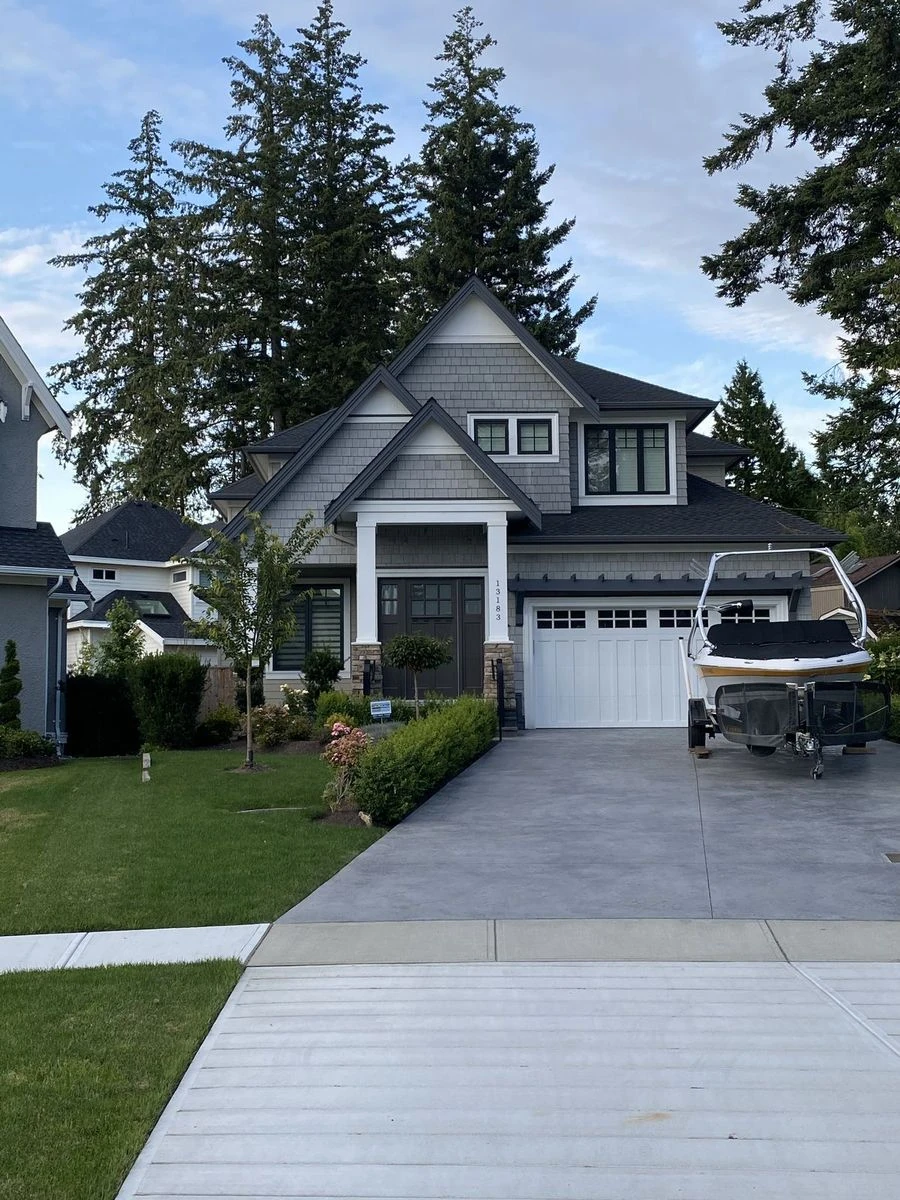
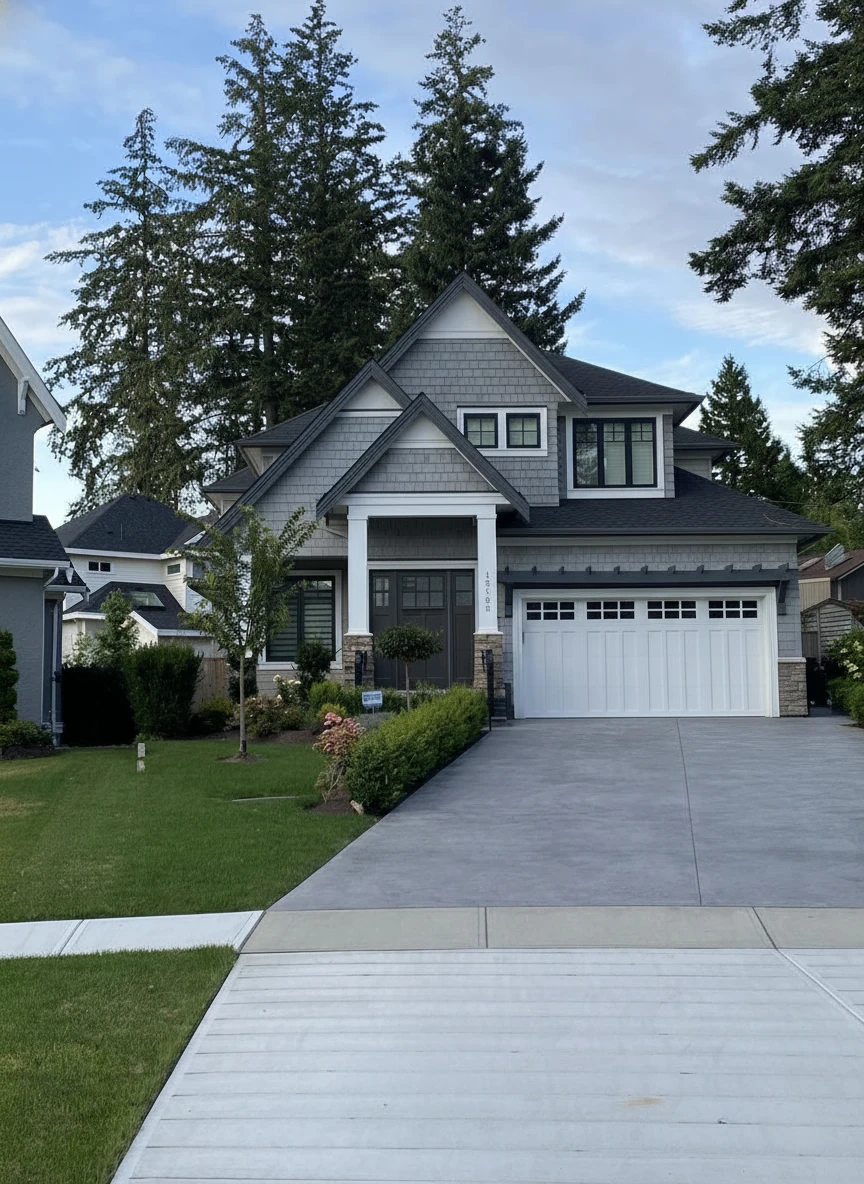
Remove the boat on the drive way